Imaging Computers: ASIAIR, StellarMate and Mini PCs
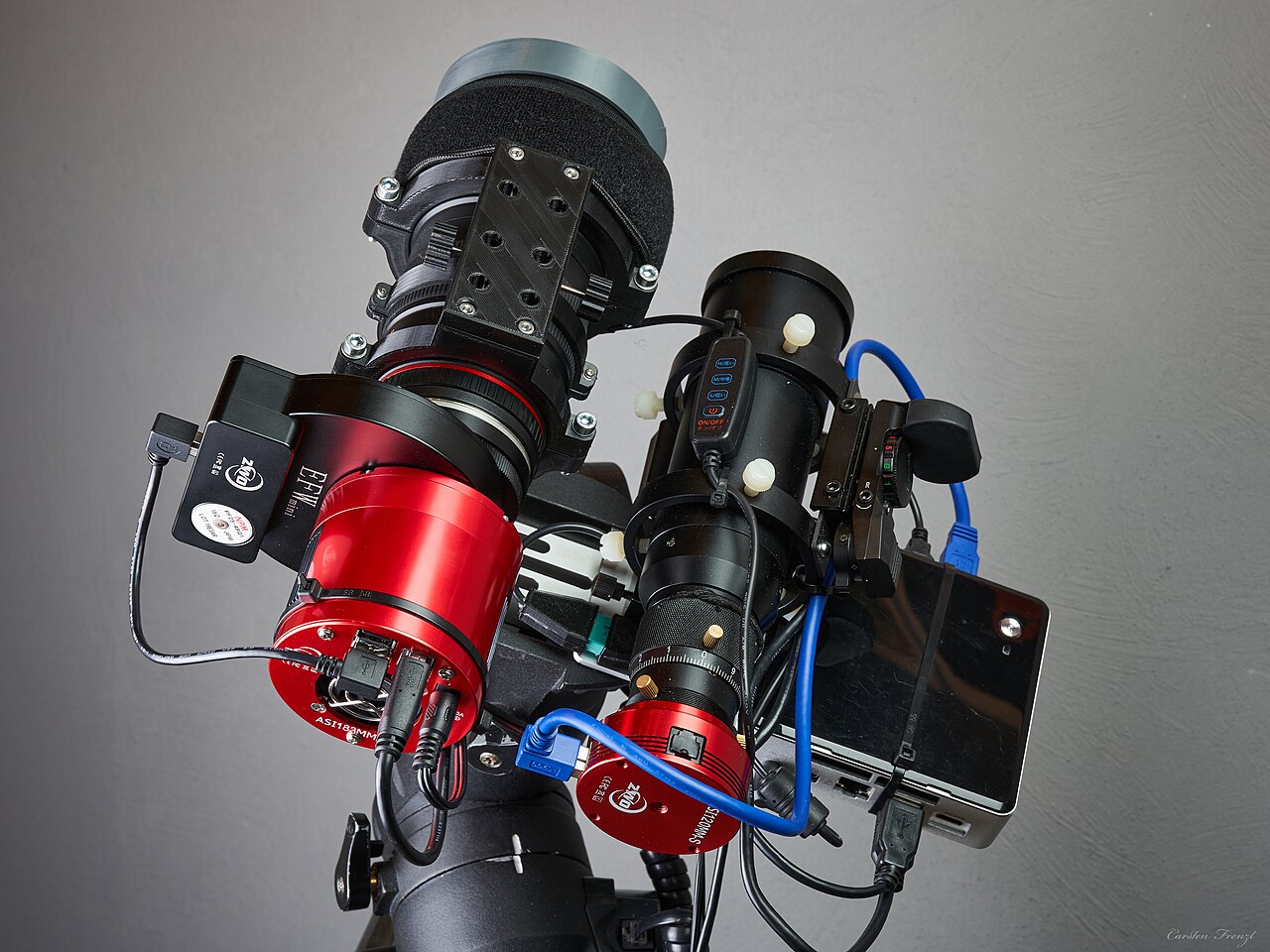

A modern imaging setup has several devices that all need a computer: the camera, the mount, a guide camera, often a motorized focuser and a filter wheel. You can run them from a laptop on a long USB cable, but most imagers now put a small computer on the mount itself and control it over Wi-Fi from a phone, tablet or the laptop indoors. This guide explains what such a controller does and compares the main options. Prices are from the makers' stores or High Point Scientific on November 25, 2026, unless noted.
What an imaging computer does
- Camera control: sets exposure, gain and cooling, takes the frames and saves them.
- Mount control: points the telescope (GoTo) and handles the meridian flip when the target crosses the meridian.
- Plate solving: takes a short frame, matches its stars against a catalog to work out exactly where the telescope is pointing, then corrects the mount until the target is centered. It also helps with polar alignment.
- Guiding: reads a guide camera and sends small corrections to the mount, usually through PHD2 or a built-in guider; see mounts for why strain-wave mounts need it.
- Focusing: with a motorized focuser, it steps through focus, measures the star sizes and moves to the sharpest point, and can refocus during the night.
- Sequencing: runs the night's plan unattended: targets, filters, number of frames, refocusing and dithering.
- Power and USB: many controllers also supply 12 V power to the camera, mount and dew heaters, which cuts down the cables running down the mount.
Smart telescopes do all this inside one box; see smart telescopes. For live viewing while you capture, see live stacking.
ZWO ASIAIR
The ASIAIR is a small box that runs ZWO's ASIAIR app on an iPhone, iPad or Android device. It is the simplest separate controller to learn, because one app covers everything from polar alignment to the night's plan.
- ASIAIR Plus 256GB: $399. 256 GB of built-in storage (the new version has no memory-card slot), four 12 V outputs, two USB 3.0 and two USB 2.0 ports. The power supply is not included.
- ASIAIR Mini: $249 at High Point Scientific, with 32 GB of storage, four 12 V outputs and four USB 2.0 ports. It was sold out with no expected date and no back orders, so it may be ending; ZWO has said nothing.
- Software: the app reached version 3.0 in July 2026 and 3.1 on November 23, 2026. It includes plate solving, live stacking, scheduled plans, autofocus with ZWO's EAF focuser and meridian-flip settings.
The catch is the camera list. The ASIAIR works with ZWO's own cameras and, according to High Point Scientific, nearly 100 Canon and Nikon DSLR and mirrorless bodies. ZWO's ASIAIR Plus manual says a DSLR can only be the main imaging camera, not the guide camera. Astro cameras from other makers are not on the list, and the focuser support is built around ZWO's own. If you already own a QHYCCD, Player One or ToupTek camera, or plan to buy one, choose one of the open systems below.
ZWO "Air" cameras: the ASIAIR built in
ZWO's newest form of the ASIAIR is inside the camera. The Air cameras combine a cooled imaging sensor, a small built-in guide sensor, Wi-Fi, 256 GB of storage, a USB hub and 12 V outputs, and run from the same ASIAIR app. That removes the separate guide camera, controller and most cables. They can also be run from ZWO's ASIStudio or other software through ASCOM Alpaca. Prices at ZWO's US store on November 12, 2026:
- ASI585MC Air: $799 (1/1.2-inch Sony IMX585 sensor)
- ASI2600MC Air: $1,799 on sale, regular $1,999 (APS-C Sony IMX571 sensor)
See the digital camera round-up for these sensors.
StellarMate
StellarMate, made by Ikarus Technologies, runs StellarMate OS: Linux with the free KStars/Ekos imaging suite and the INDI device drivers, plus StellarMate's own apps for iOS and Android. INDI supports cameras, mounts and focusers from most makers, so you are not tied to one brand.
| Model | Inside | Power outputs | Price |
|---|---|---|---|
| StellarMate X | Intel Celeron J4125, 4 or 8 GB, four USB 3.0 | none (needs a separate power hub) | $299 (64 GB) / $349 (128 GB) |
| StellarMate Pro | Raspberry Pi Compute Module 4 | 12 V, dew heater and variable-voltage outputs | $449 (4 GB / 64 GB) / $599 (8 GB / 128 GB) |
| StellarMate Pro X | Intel N100, 8 GB, 256 GB NVMe | four switchable 12 V, two dew heater, GPS; four USB 3.2 | $749, pre-order, shipping December 2026 |
The older StellarMate Plus is no longer in StellarMate's store. If you have your own Raspberry Pi 4 or 5 (4 GB or more) or a mini PC, StellarMate sells the OS on its own for $59 per edition. The OS was at version 2.3.0 in August 2026.
PrimaLuceLab EAGLE
PrimaLuceLab's EAGLE6, launched in early 2025, is a full Windows 11 computer built into a mount-top unit with power outputs, so it runs any Windows imaging program, N.I.N.A. included. The base model has an Intel Celeron J6412, 8 GB of memory, a 128 GB NVMe drive and seven 12 V outputs; the EAGLE6 S, PRO (Intel Core i5) and XTM (Core i7) step up. We could not verify a current US price; undated dealer listings put it well above the other options here.
A mini PC with N.I.N.A. and PHD2
The do-it-yourself route is a small Windows mini PC on the mount, controlled from indoors by remote desktop, running free software:
- N.I.N.A. (Nighttime Imaging 'N' Astronomy), free and open source, has become the standard free Windows imaging suite. Version 3.2 came out in November 2025. Its Advanced Sequencer runs the whole night, and plugins add features. It needs 64-bit Windows 10 or later and works with ASCOM and Alpaca drivers plus native drivers for ZWO, QHYCCD, Player One, SVBONY and other cameras.
- PHD2 (version 2.6.14) handles guiding and dithering for N.I.N.A. and most other programs.
- ASTAP is the free plate solver N.I.N.A. recommends.
A mini PC has no 12 V outputs, so pair it with a power hub such as Pegasus Astro's Pocket Powerbox Advance Gen3 ($372.90, pre-order: four 12 V outputs plus adjustable and always-on outputs, two dew heater ports, four USB 3.0 and two USB-C) or the larger Ultimate Powerbox v3 ($698.64, with a mount for a mini PC). Pegasus makes the power hubs but no computer. As an example of cost, ScopeTrader reviewed the MeLE Quieter 4C (Intel N150, 16 GB, 512 GB, Windows 11 Pro) at $239 in April 2025.
Comparison
| Option | Software | Cameras | Price (Nov 2026) | Best for |
|---|---|---|---|---|
| ZWO ASIAIR Plus | ASIAIR app (phone or tablet) | ZWO cameras, Canon and Nikon bodies | $399 | Simplest setup with ZWO gear |
| ZWO Air camera | ASIAIR app, ASIStudio, Alpaca | Its own sensor, built-in guiding | $799-$1,999 | Fewest cables |
| StellarMate X / Pro / Pro X | StellarMate OS (KStars/Ekos, INDI) | Most makers via INDI | $299-$749 | Mixed brands, phone app |
| StellarMate OS on your own Pi or PC | StellarMate OS | Most makers via INDI | $59 plus hardware | DIY on Linux |
| PrimaLuceLab EAGLE6 | Windows 11 | Any Windows camera | not verified | All-in-one Windows unit |
| Mini PC + N.I.N.A. + PHD2 | Windows, free software | ASCOM, Alpaca and native drivers | about $240 PC (2025) plus a power hub | Most control, lowest software cost |
Which to choose
- You use ZWO cameras and want it to just work: an ASIAIR Plus, or an Air camera if you are buying a new deep-sky camera anyway.
- You have cameras or focusers from several makers: StellarMate or a mini PC.
- You want the most features and plugins, and are comfortable with Windows: a mini PC with N.I.N.A. and PHD2.
- You only image the Moon and planets: a laptop with a capture program is enough; see image capture software.
Sources
- zwoastro.com/product/asiair-plus (ASIAIR Plus 256GB, $399, new version without TF card slot)
- highpointscientific.com/zwo-asiair-plus-wifi-camera-controll... (ASIAIR Plus ports, storage, camera support (ZWO cameras plus nearly 100 Canon and Nikon bodies), power supply not included)
- zwoastro.com/software/asiair (ASIAIR app V3.1 for iOS and Android, compatible with ASIAIR Pro, Plus and Mini)
- zwoastro.com/2026/07/15/asiair-new-features-and-user-guide (ASIAIR V3.0 released July 2026)
- i.zwoastro.com/wp-content/uploads/2026/03/65dcf5cda6be810ffd... (ASIAIR Plus manual, plate solving, live stacking, plans, focus mode, meridian flip, DSLR as primary camera only)
- highpointscientific.com/zwo-asiair-mini-astronomy-wifi-smart... (ASIAIR Mini price, specs, sold out with no ETA)
- us.zwoastro.com/products/asi2600mc-mm-air (ASI2600MC Air built-in ASIAIR, guide sensor, storage, Alpaca support, price)
- us.zwoastro.com/products/asi585mc-air (ASI585MC Air built-in ASIAIR and guide sensor, price)
- stellarmate.com/products.html (current StellarMate hardware and prices; StellarMate Plus no longer listed)
- stellarmate.com/shop/ika-870-256gb-stellarmate-pro-x-8gb256g... (StellarMate Pro X specs, $749, pre-order shipping December 2026)
- stellarmate.com/help/_sources/manual/stellarmate-pro/index.r... (StellarMate Pro uses a Raspberry Pi CM4; power and dew outputs)
- stellarmate.com/help/_sources/manual/stellarmate-x/index.rst... (StellarMate X specs, no power outputs)
- stellarmate.com/changelog/os (StellarMate OS 2.3.0, August 2026)
- stellarmate.com/products/stellarmate-os/stellarmateos-v2-rpi... (StellarMate OS for Raspberry Pi 4/5, $59)
- scopetrader.com/primalucelab-eagle-6-lands (PrimaLuceLab EAGLE6 specs and versions (February 2025))
- highpointscientific.com/pegasus-astro-pocket-powerbox-advanc... (Pegasus Pocket Powerbox Advance Gen3 price and ports)
- pegasusastro.com/products/ultimate-powerbox-v3 (Pegasus Ultimate Powerbox v3 ports and mini PC mount)
- highpointscientific.com/pegasus-astro-ultimate-powerbox-v3 (Ultimate Powerbox v3 price)
- nighttime-imaging.eu (N.I.N.A. free and open source, Advanced Sequencer, plugins)
- nighttime-imaging.eu/download (N.I.N.A. 3.2 stable, Windows 64-bit installer)
- nighttime-imaging.eu/2025/11/12/n-i-n-a-version-3-2-is-here (N.I.N.A. 3.2 released November 2025)
- nighttime-imaging.eu/docs/master/site/requirements (N.I.N.A. system requirements)
- openphdguiding.org/downloads (PHD2 2.6.14, December 2025)
- hnsky.org/astap.htm (ASTAP plate solver used by N.I.N.A. and other programs)
- indilib.org (INDI device drivers for Linux and macOS)
- scopetrader.com/astro-imaging-pc-the-mele-quieter-4c (example mini PC (MeLE Quieter 4C) and its April 2025 price)