How Smart Telescopes Work
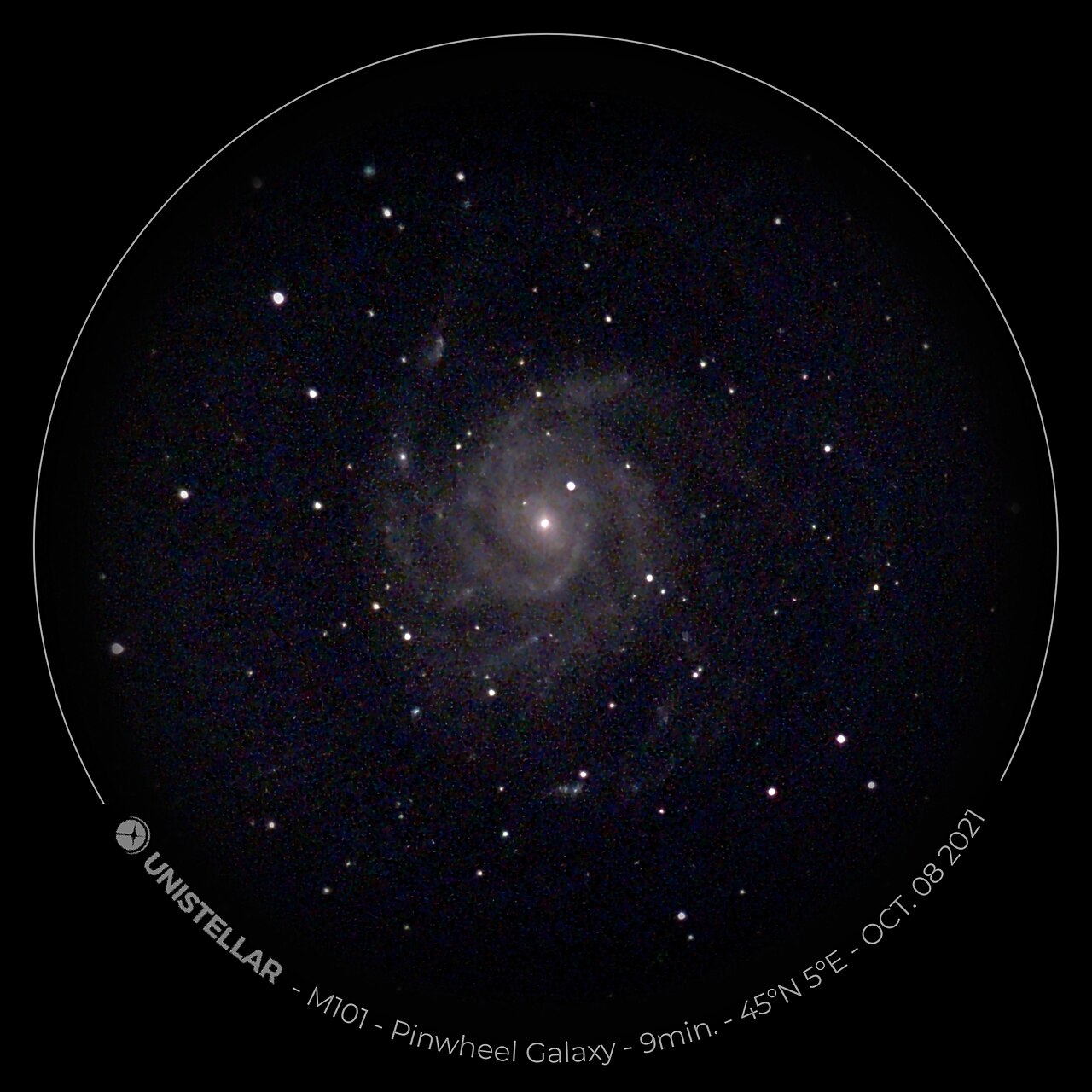

Inside every smart telescope are the same parts a traditional imaging setup uses: a small telescope (usually an apochromatic refractor), an astronomy camera with a Sony, OmniVision or SmartSens sensor, a filter wheel or drawer, a motorized mount, a small computer, storage and a battery. The difference is that they are built into one housing and run by software, so the decisions an astrophotographer makes by hand are made for you. This page goes through what happens between tapping a target on your phone and seeing the picture. For the models themselves, see the best smart telescopes in 2026.
Finding targets: plate solving
A smart telescope has no finder and needs no star alignment from you. It takes a picture of the sky, measures the pattern of the stars and matches it against a star catalogue stored on board. This is called plate solving, and it tells the telescope exactly where it is pointing. Celestron's Origin uses its StarSense system with images from the main sensor this way; Astronomy magazine found it aligned in about a minute. After that, the app's Go-To finds targets as on any computerized mount.
The same technique is used in traditional setups by programs such as N.I.N.A., ASIAIR and SharpCap (see image capture software).
Tracking on an alt-az mount
Most smart telescopes sit on an altitude-azimuth (alt-az) mount: one motor turns the telescope left and right, the other up and down. That is simple, compact and needs no polar alignment, and the two motors together keep the target in the middle of the frame as the sky turns.
Short exposures and live stacking
Instead of one long exposure, the telescope takes many short ones (sub-exposures, or subs): 10 seconds each on the Origin, for example. Each new sub is aligned to the previous ones by its stars and added to a running stack, so the image on your screen gets smoother and shows fainter detail the longer you let it run. This is live stacking, the same method an amateur uses with a camera and a laptop for live stacking and EAA.
It is also the webcam astronomy idea this site was founded on. Webcam imagers record hundreds of frames and let software register (align) and add them: for planets that is video integration, which keeps only the sharpest frames; for frames that drift across the sensor it is drift integration, which re-aligns each frame on a reference point before adding it. A smart telescope does that registration on every sub, live, inside the box.
Short subs also make each frame less sensitive to small tracking errors.
Field rotation: why frames are rotated and cropped
An alt-az mount keeps the target centered, but it cannot keep the field from turning. Seen from the ground, the sky rotates around the celestial pole, so over time the stars around your target slowly turn around it like a wheel. Celestron explains that during a long exposure only the center stays pinpoint, while stars near the edge trail into arcs, and that only a polar-aligned equatorial mount removes the effect.
Smart telescopes deal with it in two ways:
- Short subs. Each sub is short enough that the rotation within it does not show. On the Origin in alt-az mode, exposures are limited to about 30 seconds before stars elongate. ZWO says its Seestars in alt-az mode work best with short exposures and live stacking.
- Rotating each frame. Before a sub is added, the software rotates it to match the stack. Over a long session the field has turned, so the corners of later frames no longer cover the corners of the first ones. Those corners have less data, which is why the final image is often cropped or has noisy edges.
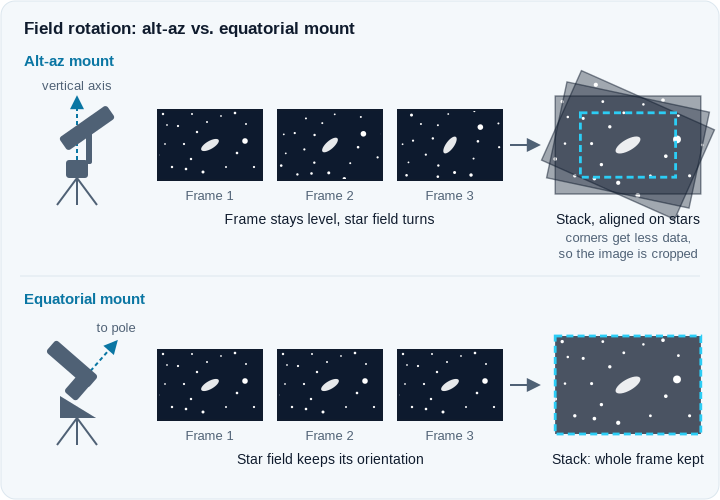
Field rotation: on an alt-az mount the field turns between frames, so the stacked corners get less data and are cropped; an equatorial mount keeps the field's orientation.
Some designs fix the problem mechanically. The DWARF Draco rotates its sensor to follow the field, and DWARFLAB quotes exposures up to 300 seconds. Sky-Watcher's ORBIS prototype has a built-in ±180° field derotator, and Vaonis's Hyperia also lists a field derotator.
Equatorial mode
The other fix is to tilt the telescope so that one of its axes points at the celestial pole, turning the alt-az mount into an equatorial one. The telescope then follows the sky by turning around that one axis, and the field no longer rotates.
- ZWO Seestar: EQ mode came to the S50 and S30 in a 2025 software update. On the S50 Pro, 60-second exposures are available only in EQ mode with accurate polar alignment, and ZWO recommends its TH10 tripod head; on the S30 Pro, EQ mode cannot be turned on without the TH10.
- DWARFLAB: the app added EQ mode in 2024. On the DWARF mini it is required for exposures of 30 seconds or longer and for its mosaic modes.
- Celestron Origin: a free app update added EQ mode with the NexStar SE/Evolution wedge, app-guided polar alignment and optional StarSense autoguiding. ScopeTrader reports that 1–2 minute subs are then possible, though 30–60 seconds is practical with such fast optics.
Hot pixels and dark frames
Every camera sensor has hot pixels that show as bright dots. Smart telescopes fight them in two ways. Dithering shifts the telescope slightly between frames, so the fixed defects land in different places once the frames are aligned on the stars, and the stacking rejects them as outliers. Dark frames record the sensor's noise with no light reaching it, to be subtracted from each sub (see understanding dark frames). The Origin builds its own dark library (subs up to 30 s, about 20 minutes) from the app's Advanced settings. Every Seestar has a built-in dark filter that blocks the light for dark calibration; one Seestar owner reported in ZWO's forum that the saved subframes are already dark-subtracted, though ZWO does not say so. The Seestar and Origin cameras are not cooled, so their darks are taken at the night's temperature (the Draco is the exception, with a cooled sensor).
Filters
Many smart telescopes have built-in filters selected by the app:
- UV/IR-cut: the normal filter for natural color.
- Dual-band (duo-band): passes only the light of hydrogen-alpha and oxygen-III, the colors emission nebulae shine in, and blocks most light pollution. The Seestars use OIII 30 nm and H-alpha 20 nm passbands; the DWARF 3, DWARF mini and Draco have H-alpha/OIII filters, and the Draco SHO Edition adds an SII/OIII filter. Dual-band filters help with nebulae, not with galaxies or star clusters, which shine in all colors.
- Dark: the shutter for dark frames, described above.
Vaonis's Vespera models have no built-in filters; solar, light-pollution and dual-band filters are sold separately.
Mosaics
For targets bigger than the field of view, newer models shoot mosaics. On the Origin you draw a box around the target; the telescope splits it into overlapping tiles, slews to each, stacks it and stitches the tiles into one image. The DWARF 3 has a 2 × 2 mosaic mode, Vaonis's CovalENS mode widens the Vespera II's field from 2.5° × 1.4° to 4.33° × 2.43°, and the Seestar S30 Pro and S50 Pro also stitch wide-angle Milky Way panoramas. Astronomy magazine notes the drawbacks: mosaics can take hours, and because the tiles are shot at different times, a passing cloud can dim one tile.
Getting the raw frames out
The app shows you a finished, stretched JPEG, but the real data is in the raw files, and you get much more out of a session by processing them yourself.
- Seestar: saves stills as JPEG or FITS. The S30 Pro can save every FITS subframe as well as the stack if you turn on the option before the session.
- DWARFLAB: the DWARF mini saves raw frames as TIFF or FITS and the stacked result as FITS. Since a 2025 app update, 16-bit astro stacks are linear (unstretched) and ready for processing, and since November 2026 the app can download FITS stacks from the DWARF 3, DWARF mini and Draco.
- Celestron Origin: raw subs are saved as FITS and can be copied to a USB drive or downloaded over its Wi-Fi.
Load the subs in Siril (free, open source) or PixInsight (commercial) to stack them again with your own settings, then remove gradients, calibrate color and reduce noise. Siril opens .fit, .fits and .fts files and can also assemble mosaics using plate solving. Our image processing software guide covers the programs, and AI tools for astrophotography the noise and star-removal tools.
The Seestar S30 Pro and S50 Pro also support ASCOM Alpaca, so programs such as N.I.N.A. can control them like any other camera and mount.
Planets, the Moon and the Sun
Smart telescopes have a solar system mode for the Sun, the Moon and the planets. The Seestar app's Video Stack works like classic webcam astronomy: it records a short video (about 10 seconds, with RAW format turned on), then aligns and stacks the frames. But with focal lengths mostly between 150 and 450 mm, planets come out as small discs. ZWO says the S50 Pro's short focal length may not capture fine detail such as Saturn's rings, and Space.com found planetary views even on the 6-inch Origin Mark II "can be underwhelming". For planets, a long-focal-length telescope and a planetary camera remain the tools to use.
The Sun needs a proper solar filter over the front of the telescope, every time. Focused sunlight can damage the telescope and camera, and you must never look at the Sun through any optics without a filter. The Seestar S30 Plus and the DWARF telescopes come with a solar filter (the Draco Standard has one built in), and High Point Scientific lists one in the S30 Pro and S50 Pro boxes; Vaonis and Unistellar sell theirs separately.
Sources
- astronomy.com/observing/appraising-the-origin-home-observato... (Origin plate-solve alignment with StarSense and the main sensor, aligns in about a minute, raw FITS frames by USB drive or Wi-Fi)
- astronomy.com/uncategorized/celestron-origins-mosaic-mode-br... (Origin 10 s sub-exposures stacked live, dithering against hot pixels, Mosaic Mode and its limits)
- skyatnightmagazine.com/astrophotography/what-are-smart-teles... (smart telescopes stack many short exposures into a running image)
- celestron.com/origin (Origin dark-frame library from the app's Advanced settings)
- celestron.com/blogs/knowledgebase/what-is-field-rotation-how... (field rotation on alt-az mounts, only a polar-aligned equatorial mount removes it)
- scopetrader.com/celestron-origin-eq-mode-and-autoguiding (Origin alt-az exposures limited to about 30 s; EQ mode on the NexStar SE/Evolution wedge with app-guided polar alignment and StarSense autoguider; 1-2 minutes possible, 30-60 s practical)
- i.zwoastro.com/wp-content/uploads/2026/08/9cdcf7965665984d64... (Seestar S50 Pro manual, EQ mode reduces field rotation, short focal length may not show Saturn's rings)
- zwoastro.com/product/seestar-s50-pro (Seestar S50 Pro filters, 60 s exposures only in EQ mode, TH10 recommended, JPEG and FITS output, mosaics, built-in dark filter)
- seestar.com/blogs/faq/seestar-s30-pro-faq (Seestar S30 Pro saves individual FITS subframes, EQ mode needs the TH10, alt-az works best with short exposures, ASCOM Alpaca, mobile app only)
- bbs.zwoastro.com/d/18002-save-all-images-option (forum report that saved Seestar subframes are already dark-subtracted (user report, not official))
- astronomy.com/observing/zwo-unveils-the-seestar-s50-pro (EQ mode added to the Seestar S50 and S30 by a 2025 software update)
- seestar.com/blogs/tutorial/seestar-video-stack-tutorial (Seestar Video Stack aligns and stacks short videos recorded in RAW format)
- seestar.com/blogs/faq/s30 (Seestar Solar System mode; solar filter required for the Sun)
- help.dwarflab.com/docs/DWARF-mini-Smart-Telescope-User-Manua... (DWARF mini EQ mode required for 30 s and longer exposures and for mosaics; TIFF and FITS raw formats; stacked result in FITS)
- dwarflab.com/pages/dwarflab-app-firmware-download (DWARFLAB app EQ mode (2024), linear 16-bit astro stacks (2025), FITS stacked-image download (V3.4.5, November 2026))
- dwarflab.com/us/pages/astronomy-with-dwarf-3-smart-telescope (DWARF 3 2x2 mosaic mode)
- dwarflab.com/us/pages/draco-smart-telescope (Draco filters, built-in ND solar filter, EQ mode, 300 s exposures, mosaic)
- scopetrader.com/DRACO-Smart-Telescope-Launches (Draco dedicated guide camera and cooled sensor)
- vaonis.com/pages/product/vespera-ii (Vespera II CovalENS mosaic field)
- highpointscientific.com/vaonis-vespera-iii-smart-telescope-v... (Vaonis filters sold separately)
- adriasky.it/en/blogs/news/sky-watcher-orbis-smart-telescope-... (Sky-Watcher ORBIS prototype with a built-in field derotator)
- vaonis.com/pages/product/hyperia (Hyperia field derotator)
- seestar.com/products/seestar-s30-plus-smart-telescope (Seestar S30 Plus magnetic solar filter included)
- highpointscientific.com/zwo-seestar-s50-pro-smart-telescope (solar filter listed in the Seestar S50 Pro box)
- highpointscientific.com/zwo-seestar-s30-pro-smart-telescope (solar filter listed in the Seestar S30 Pro box)
- dwarflab.com/us/products/dwarf-3-smart-telescope (DWARF 3 magnetic ND solar filter included)
- dwarflab.com/us/products/dwarf-mini-smart-telescope (DWARF mini ND solar filter in the box)
- space.com/stargazing/skywatching-kit/celestron-origin-intell... (Origin Mark II planetary views can be underwhelming)
- skyatnightmagazine.com/reviews/celestron-origin-mark-ii-inte... (Origin Mark II camera is uncooled)
- siril.readthedocs.io/en/latest/file-formats/FITS.html (Siril opens .fit, .fits and .fts files and converts 64-bit FITS to 32-bit)
- siril.org/download/2025-12-05-siril-1-4-0 (Siril 1.4 plate solving, astrometric mosaic alignment, automatic dark scaling, drizzle)
- siril.org (Siril is free and open source)
- pixinsight.com (PixInsight, commercial processing platform)
- sharpcap.co.uk (live stacking aligns and derotates frames)
- nighttime-imaging.eu/docs/master/site/advanced/platesolving (plate solving defined)
- nighttime-imaging.eu/docs/master/site/advanced/dithering (dithering defined)